
Are we executing our processes efficiently, or are we just moving paper and emails in circles?
The first memories I have from the working environment, and especially of my first managers, are those of tons of paperwork, sticky notes, 2-3 agendas, and a very used and circled calendar on their desk. Each time I think about BPMS, I always go back to those images because I find them so perfectly relevant: how messy can your process look?
We deal with this issue all the time, and especially a first-time manager will face many challenges along the way, the efficiency of their process being one of them. When we don’t have a firm grip on our process and run things at a lower capability, we tend to move an email from one inbox to another. If we reach this stage of just moving things around without having any actual impact, we might as well hang it up and go home. Like any other aspect, processes require constant maintenance and upgrades to function properly, and BPMS is a sure way to achieve this
How can BPMS help my process efficiency?
BPMS improves process efficiency by replacing messy, manual habits with structured end-to-end mapping, smart workflow automation, and unified system integration. It cuts out wasted time, enforces clear ownership, and provides real-time monitoring and transparency so your team can finally stop chasing emails and run smoothly.
In this article:
- The BPMS Info You Need Right Now: Introduces BPMS as an end-to-end platform covering mapping, standardization, automation, integration, transparency, and monitoring.
- Your Process Overview: Focuses on mapping workflows to spot bottlenecks and calculate operational waste.
- To Standardize or Not to Standardize: Highlights the value of standardizing tasks while maintaining a balance and assigning clear process owners.
- Workflow Automation: Explores ways to route work efficiently, distribute workloads fairly, and eliminate unnecessary review layers.
- System Integration: Addresses how to reduce friction from disconnected tools and minimize manual data entry.
- Transparency and Audit Trail: Emphasizes personal accountability and tracking work changes through system logs.
- Continuous Improvement and Monitoring: Highlights the manager’s role in tracking performance and supporting process health.
The BPMS info you need right now
A Business Process Management System is all about improving the efficiency of your process. It’s a platform designed to discover, model, analyze, measure, improve, and optimize business processes end-to-end. Think of it as the technological engine that brings structure, speed, and visibility to how work gets done across an organization.
From the start, I want to mention this: not every company will invest in up-to-date or high-end tools for their entire process; most will actually have a mix of classic (traditional) methods and some BPMS flows. For this reason, I will focus this introduction on the aspects I found through my experience and point out the main areas I find worked best for me.
With so much available information out there, here are the fundamental aspects you will most likely find in your company’s BPMS:
- End-to-End Process Mapping: We already covered the topic in an article, but the core of it is about moving away from a messy work style to a more organized and visually stimulating way of working.
- Standardization: A topic we will talk about in detail in another article, with the core issue it is addressing being the ability of a team, company, or project to implement different standards of work that create less manual effort and more similarly efficient outputs. Think less home cooking (with a lot of individually distinct portions, smells, textures, tastes, etc.) and more fast-food, with everything having the same taste, smell, size, and price.
- Workflow Automation: Where we move away from the classic messy task assignment and work allocation, and we implement different tools or strategies to have the volumes of work routed automatically or at a better efficiency.
- System Integration: Instead of using 20 different tools that are not even linked to one another, use a proper CRM that can actually allow you to do most of the work there, rather than accessing multiple different software programs.
- Transparency: You can’t have an efficient process if you do not have transparency, or the ability to track what people did in a ticket, who was responsible for what, and when the changes took place.
- Continuous Performance Monitoring: The well-known live dashboards or Key Performance Indicators that track different metrics.
Your Process Overview
Let’s assume you reached this point with a very messy process, and you need help to improve its efficiency. The first and most important thing to look at is the big picture. This means looking over the entire thing and trying to establish where it starts and ends, what the main components, people, connected processes, or projects are, and so on. Think of it as an end-to-end process mapping. In case you need a quick intro into process mapping, this article will help out: Current State vs. Future State Process Mapping.
Why do we need this?
The answer to this question is in the problem itself: without a proper scan of the entire thing, we can’t effectively run a proper diagnosis on what is working and what is not working. To achieve the entire end-to-end view, let’s start with how the work flows. Look at whatever available documentation you have – or make one if you don’t – and capture the start and finish of the actual work. Most processes will run multiple types of work simultaneously, so you need to look at each of them and try to find out the start and finish. Say you are working on a tech support project, and the core activity is to answer technical queries from customers and try to help them out. You can’t use “answering tech queries” as the basis for where work starts and finishes; instead, you need to break it down into the types of tickets or queries you get. Then you take each of these subcategories and look at each one individually: some might start with a phone call, some with an email, and some might be transfers from other departments or based on a chat.
A great enemy you will face here is the replacement of “classical methods” of capturing data (sticky notes, very colorful Excel files, tons of Word files for each employee with very distinct notes, and so on) with a more streamlined blueprint. Use the knowledge you gained going over the Process Mapping article and start capturing these steps without needing to fall back on traditional methods. At the same time, as the leader, you must also encourage your team to spend less time on sticky notes and more on process maps. Pro-tip here: make sure you also capture the average (estimated) time for each step in the process map. This will be of great help later on, as based on it you can actually quantify the waste.
When you have everything mapped out, it’s time to review and see what areas are OK and what are Not OK. If you need help, check out this article where I’ve explained the main types of waste you can find in a process: 8 Types of Waste in Operations: DOWNTIME. Use the time captured in the process map to do some basic estimations of the amount of waste you are looking at (multiplying it by the amount of work – tickets – will give you the total effort lost, and it’s extra fancy if you divide that effort by the total number of working hours in a month to get the effort as FTE – Full-Time Employee).
To Standardize or Not to Standardize?
That is the question, isn’t it? Well, the answer to this is mostly Yes, you should. Besides the obvious effort reduction, a good, healthy standardization overhaul will also bring improved quality, a better employee experience, less pressure and overtime, and a much healthier and happier working environment. Who wants to work in a place that has constant pressure, stress, and tons of work? Be mindful, however, because anything in excess is not good, and if you try to implement standards in every little aspect, you might end up with situations that are just ridiculous and useless – and end up creating more work. Balance in all things is the key!
Standardization comes in many shapes and sizes, from the small Excel template to the bigger process change that everyone must follow. For this reason, you should test them out before implementation and make sure they work as intended. It’s not enough to just make a template that people don’t use – that’s basically wasted time.
Ownership is another thing you need to look at. Look over every aspect of your process and check for a clear process owner. If you don’t have them assigned, and if some areas are left unclear, step in, assign ownership, and make sure everyone is aware. It helps a lot if you have a file with these details that you can share, update, and talk about regularly.
It will also help to get good alignment between the task itself and what is expected from each person. Make sure you document this: people need to know what is expected of them and what they must be doing. Plus, this will work to your benefit later on when you need to hire someone new: why spend more time talking about what they must do when there’s a file available to read? And on this note, capture the decisions and approvals people need to take, from whom, at what point, in what format, etc. Ownership is not just about who is doing what; it’s the entire process of doing said task and all its layers.
Workflow Automation
Sometimes, sadly, we might be in a situation where it’s simply not possible to automatically route work to people. If you’re lucky enough and your company has a system in place, then you can skip this step, but what do you do when you don’t have it?
A lot of first-time managers struggle with this aspect because they either fixate on an “easier” fix (micromanaging) or decide to go with the flow and do whatever everyone else is doing. This is a big mistake; the fact that something was done in a specific way for 20 years doesn’t mean it’s the best or even the correct way. As such, it’s up to you, the leader, to step in and take care of it.
There are many ways to look at the problem of workload assignment; the only thing stopping you is fear. Be creative, look for solutions, and don’t worry about what could happen – focus on what your solution is doing and improve on it. For example, tickets people need to manage can be extracted into a report and shared with the team, or shared inboxes can be created with special rules to route things to very specific addresses, etc. Just remember that governance will save you a lot of headaches: be sure you have a proper tracking mechanism for checking the workload.
And of course, any good leader will not only check if the work is completed but will also check if it’s equally distributed and you don’t have people with bigger chunks and people with smaller ones…it’s not fair after all.
On this topic, we need to talk about cycle time reduction and bottlenecks. Any step in your process that adds waiting time, a hard stop, a block, or additional hands for review should be checked and (if possible) removed. You don’t need extra layers all the time, and if things can run faster, why shouldn’t they?
System Integration
This one is a bit trickier to look at, but it’s worth giving it a go. While most companies are already using proper CRMs, some still struggle with multi-tool dependencies and the way they integrate (or don’t) with one another. When you spend a lot of time navigating between 10 different tools to achieve the desired result, you know something is wrong. It’s worth going over them, talking to your manager or other people, and looking at potential areas for improvement.
Some fixes here can also be achieved with more traditional methods, like using a unique identifier present in all the tools you are using in order to cross-check one ticket across all 10 tools. If you don’t have one, you can improvise and maybe create one in a field that is less important.
Manual data entry is still a struggle. For this reason, you can look at options to help you do less manual work. For example, many tools like SAP have upload functions people can take advantage of, and instead of manually adding data by hand, you can upload an Excel template. If you don’t check for solutions, you will never know. Just don’t get discouraged and give up: try, try, and try again until you have something better.
Transparency and Audit Trail
This one is all about personal accountability and the capability of the leader to track work across time and space. Similar to system integration, this is also tied to the tools people are using in your company, with the vast majority of them having the capability to check all these aspects. The important part here is to make sure you are using them, as you will have to investigate errors, check blockages, and help people with questions about tickets or work items.
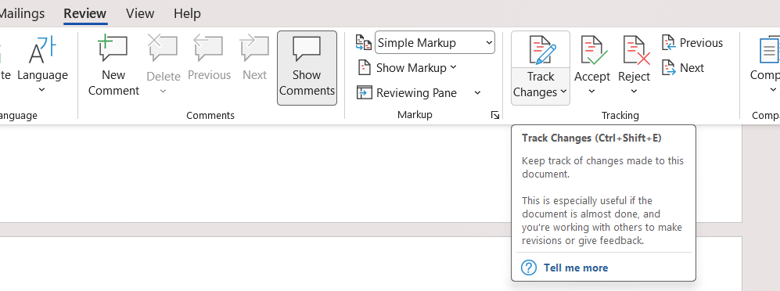
Some of these methods can also be implemented in other tools much more easily. For example, you can have Word documents track changes and see what each person who accessed the file did.
Continuous Improvement and Monitoring
The most important aspect of a manager’s job: track, monitor, and help with performance. It’s in the actual name after all, right?
There is no way a team can achieve success if there’s no one there to monitor and help out. It’s the most human thing I can think about right now: we all follow this in everything we do. Look at how society runs and you will find the answer. People need leaders who help out, support, and look over the overall health of a process.
On this topic, we can talk about many different things, but I would rather leave you with more interesting links to articles I have already published to get all the support you need:
- Employee Performance Issues: The Early Action Guide
- Performance Management Dashboard: Essential Starter Tips
- Data Ethics and Privacy: The New Manager’s Guide
- Leading Indicators – Lagging Indicators
- Vanity Metrics vs. Actionable Metrics · Defining Your Team’s Core KPIs
- Goodhart’s Law: When Metrics Backfire
And this concludes our intro to BPMS. Until the next one, stay happy, healthy, and safe!