
How do I write procedures that don’t just sit in a folder gathering dust?
In any respectable business, processes are captured in writing. Companies do this because without written procedures of what is expected from people, there is no way to do the job – it would be complete chaos, with every person either doing what they think should be done, asking each other, or ultimately starting to write things down themselves. I like to think about it in terms of personal home improvement: recipes. I like to cook, and as much as I would love to be this supreme home chef with an excellent memory, great cooking is a blend of soul and science, with the latter being the written part of any recipe.
With the overflow of processes we deal with, sometimes a new manager will find themselves in a strange place with very messy procedures. When your SOPs are bad, people don’t pay attention, they get frustrated, or they simply ignore them completely. This, in turn, creates the famous opportunity for error, where incorrectly or improperly written work instructions cause a negative process impact: things aren’t clear, there is too much text, or there isn’t a good, readable structure.
What can I do if my team does not follow the SOPs?
Writing bad Standard Operating Procedures leads to chaos, errors, and disengaged teams. To build SOPs people actually use, stop writing dense policy manuals and start creating clear, actionable guides. Focus on active verbs, clean visual hierarchy, and simple step-by-step structures. Keep your procedures easily accessible, routinely updated, and empower your team to maintain them for smooth daily operations.
What you will find in this article:
- Why SOPs turn bad: Shift your focus from writing static policy documents to creating live, usable guides that directly explain how to execute a task.
- The Writer Syndrome: Cut unnecessary text and write short, active instructions from the perspective of the person actually doing the work.
- The correct format: Use headers, clear spacing, lists, and simple visual aids so the document is effortless to scan and follow.
- It’s all about Action-Oriented Steps: Start every step with a strong verb, cut corporate jargon, and explicitly state both the trigger and what “Done” looks like.
- The Triple A: Available, Accessible, and Alive: Store SOPs where teams naturally work, use logical naming conventions, and establish regular reviews so procedures stay current.
Why SOPs turn bad
It’s not really a surprise when we think about it. I have seen so many wrongly created procedures, missing or incomplete work instructions, and in some cases an utter lack of SOPs altogether that I am no longer shocked by such a statement. From my experience, this usually happens in very tenured teams or places without good leadership. When you have very tenured people, there is always the risk that because they have so many years of experience doing the job, SOPs are no longer “needed.” “Needed” is not an appropriate word here, because it’s not about needing something – it’s about making sure that whatever you are doing is done by the book. Additionally, forgetting them because there is no “need” leaves room for the equally famous “we no longer review and update them,” which causes process misalignment and significantly increases the risk of process errors.
Many treat the SOP as a place of pure documentation, when in fact it’s less about that and more about action. The scope of a work instruction is to provide clear, to-the-point, and simple actions you need to take in order to complete a task. It is not a debate or a history of said task, nor is it a place to add so much text that it becomes a messy blob of words people really don’t want to read.
Here is a more unique perspective on the SOP: stop writing policy and start building usable guides. I know it sounds a bit “fluffy” and very LinkedIn-ish, but it really is like that. We spend so much time focusing on adding every possible aspect into an SOP that we forget a simple fact: what do we intend to do with it? What is the purpose of this document, if not to show people how to do a task?
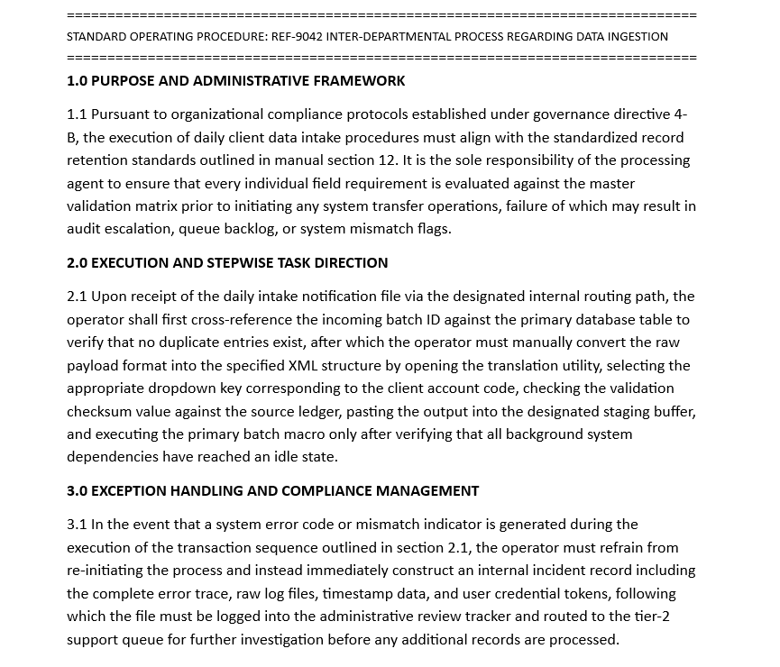
I know it’s easy to talk about, and you might think it’s harder to put into practice, but you will see that making efficient, readable, and easy-to-follow SOPs is not as hard as you think. So, let’s start with this statement: if your work instructions look anything like the picture below, you need to stop everything you are doing and start working on an SOP Project Management Plan to revamp them.
The Writer Syndrome
The first step you need to take in learning how to create better SOPs addresses a very common and unfortunate issue people have: too much writing. Listen, people really don’t have time at work to read novels about their tasks. It’s boring, it shows a lack of respect for people’s time, and it gives a poor image of leadership. People don’t want to read 50 Shades of Order Entry; they want a quick, simple, and easy-to-follow guide on how to do the actual order entry task.
To achieve this effect, start with the standard work principle. Use your process maps, SIPOC, or whatever other documentation you have that lists the step-by-step instructions for a task. If you need a bit of background, I cover both topics in these articles:
- SIPOC: Creating a Process Diagram
- Value Add Activity: First-Time Manager Handbook
- Current State vs. Future State Process Mapping
Next, you need to change your mindset a bit: don’t write the SOP as if you are an auditor; write it from the point of view of the person doing the job. This is most helpful because it keeps you grounded in the actual actions that should be captured: short and to the point. Always review the length – if there’s too much text, cut some of it off. Less is more in this case.
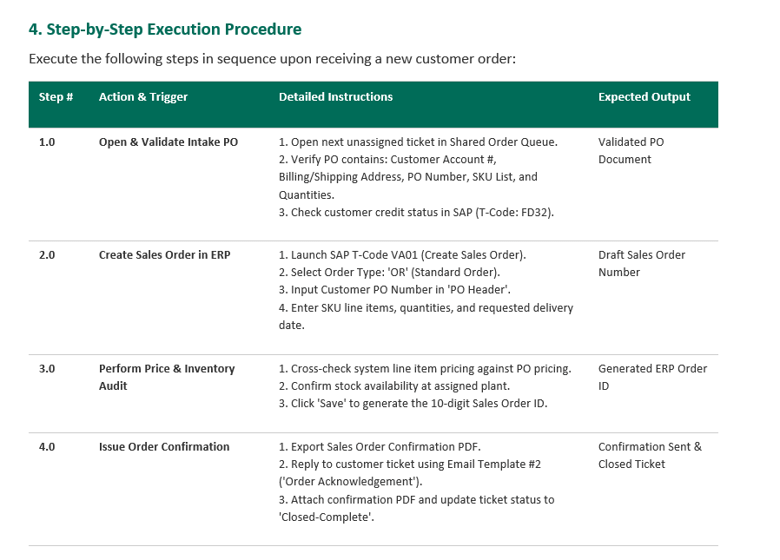
Instructions should always be short, direct, and active. They need to describe the exact action the person must take – nothing else. I know we are sometimes tempted to add extra layers, aspects, and points of view about the overall process, but they really are not needed. Exceptions can be captured in a dedicated section of the SOP using the exact same approach. And if you really must specify something about the overarching process, add a dedicated section for that; as long as you keep it short, clear, and to the point, there will be no issue.
Something people don’t give enough thought to is the “why” behind critical steps. You see, when you focus on the “why,” you can create instructions that speak to the action itself, not the “lore” of the task.
Here is an example you can relate to:
The correct format
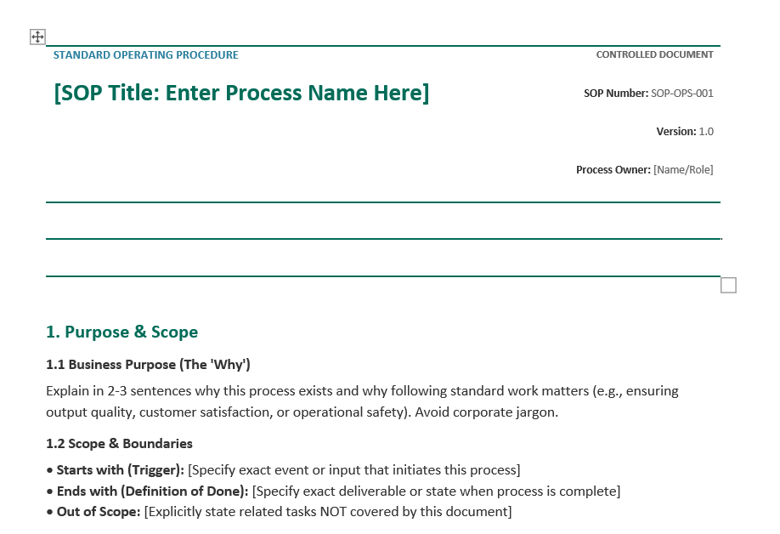
In my experience, a lot of SOPs suffer from what I call “the format issue.” They are messy and just… wrong. When you first open a work instruction, your eyes immediately go to the formatting. If it’s messy and doesn’t make any sense, you will quickly lose interest or have to work twice as hard to understand it. Not a good sign!
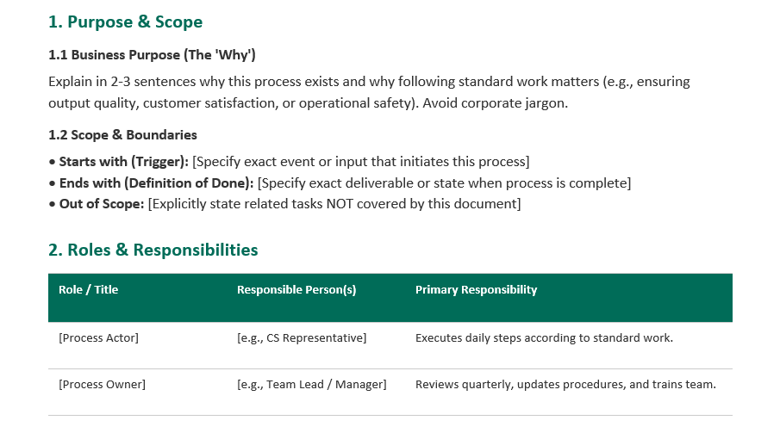
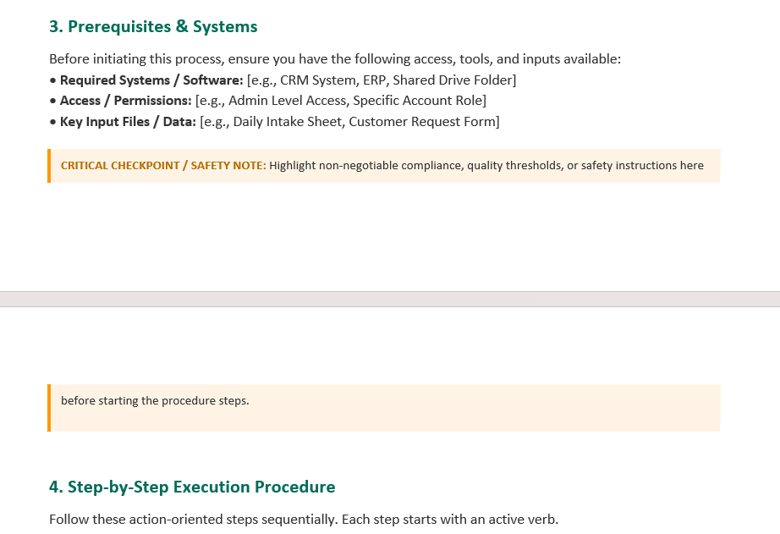
The use of a clear visual hierarchy with headers and spacing is key. SOPs should make good use of negative space (blank areas), have a clear and very simple structure, and highlight sections using headers. I know some people are afraid that by leaving things out, team members might miss something, but strangely enough, it’s the exact opposite: clean, simple, and easy-to-read will beat crowded and messy any day.
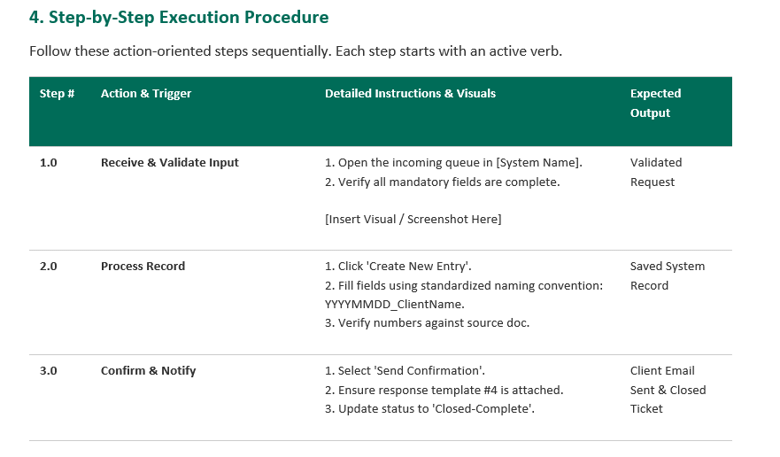
Don’t be afraid to add visual elements: diagrams, screenshots, or even videos if you want to get fancy. Use whatever visual tools you have to help people react faster and perform better. The goal is to show how to do the task – nothing else.
For more complex processes, it helps to break them down into bullet points or numbered lists. This benefits people from multiple perspectives: it gives them a clear image of the number of steps, provides a better visual list of items to check while working, and generally creates a better reading experience when things are neatly listed step-by-step.
When key callouts or warnings are needed, make sure you highlight them as such. Just don’t overuse colors (especially red), bold text, or other formatting highlights. Less is more. When you overuse something, it loses its significance. You can’t have 70% of the SOP highlighted in red!
It’s all about Action-Oriented Steps
Using a strong verb as the leading point for each step is a big plus for anyone looking to remove boredom from SOPs. People simply react better when we write instructions this way. Here are a few examples:
- Example 1:
- Passive / Wordy: The customer account details and credit limit should be checked by the agent in the system prior to when a new sales invoice is generated.
- Strong Verb: Verify customer account details and credit limit in the system before generating a new sales invoice.
- Example 2:
- Passive / Wordy: You will need to take the monthly inventory log and export it as a CSV file so it can be saved in the team’s shared drive folder.
- Strong Verb: Export the monthly inventory log as a CSV file and save it in the team’s shared drive.
- Example 3:
- Passive / Wordy: A physical inspection of the shipment for box damage or missing seals is required before the carrier delivery sheet gets signed.
- Strong Verb: Inspect the physical shipment for box damage or missing seals before signing the carrier delivery sheet.
And while we are talking about action-oriented steps, here’s another thing you need to do: cut all corporate jargon and fluff from your SOPs. If someone needs an entire dictionary to understand a procedure, something isn’t right. Fluff has no place in work instructions – save it for meetings and customer presentations. If you really can’t avoid jargon, create a dedicated section in the SOP for acronyms and abbreviations.
Any good SOP will define two very important aspects:
- The starting point of the task: What triggers the need to perform the task in the first place (the point of origin).
- What “Done” looks like: How someone doing the task for the first time will know it has been successfully completed.
The Triple A: Available, Accessible, and Alive
SOPs should be stored in a place where people work daily, not in a hard-to-access repository requiring multiple logins and a complicated process. If they are hard to access, people simply won’t use them – or worse, they will print hard copies instead of checking the live versions that receive real-time updates. Keep this in mind; it will save you a lot of headaches (and I speak from personal experience here).
Another major factor is how easy it is to find a specific SOP. When you have too many documents – especially with long, complicated naming conventions – people will struggle to find what they need in time. Imagine someone on a customer call who needs information immediately and can’t find it. Try to structure your folders and name your SOPs logically: create clear category folders, prefix file names with numbers, or use whatever system creates clarity during a quick search.
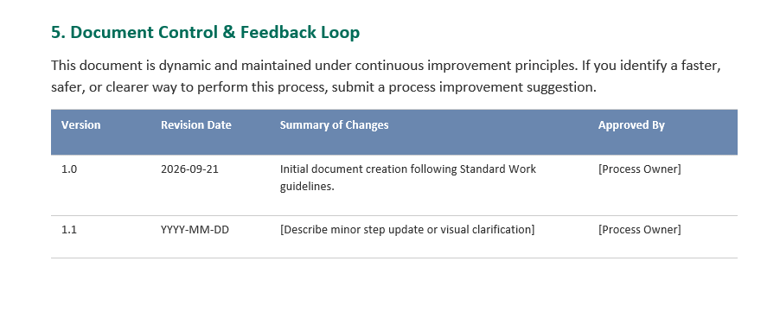
Reviewing and updating SOPs must become your new best friend. I know some of you might say, “Well, we update them when needed,” and that’s fine, but people forget. To avoid issues, establish a proper framework: schedule an annual SOP review process and define a clear procedure for live updates so everyone knows how real-time changes are handled. You might think it’s overkill, but these instructions are the core of your operation – the better maintained they are, the smoother your processes will run.
Finally, empower your team to flag out-of-date SOPs and propose fixes. Don’t take this entire task on your own; let your team contribute. After all, they are the ones doing these tasks day in and day out.
Until the next article, stay safe, happy, and healthy!