
What HR processes do I need to master immediately?
A lot of things happen for the first-time manager: meeting the team, meeting the customer, understanding the process, learning all the business lingo, setting up connects, 1-on-1s, and many more. In this entire mess of “things to do,” rarely do first-timers get a good onboarding regarding the HR systems. There are many different ways to approach this topic, since most companies have their own way of working, systems, and tools. So, for the sake of the “old-fashioned” approach, let’s just assume you have no complicated systems or tools, and you have to make do with an Excel file and your skills.
As a first-time manager, what do you need to know right now?
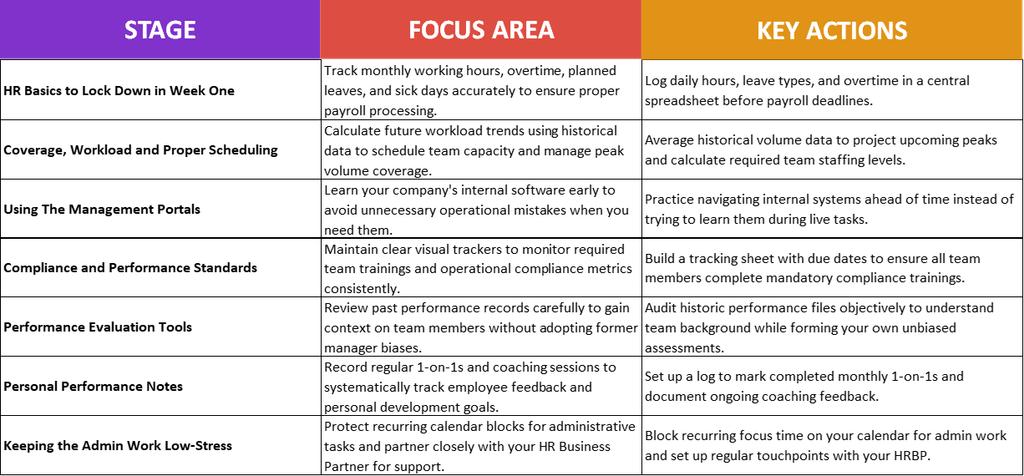
Mastering HR basics is essential for new managers relying on simple tools like Excel. Start by tracking attendance, working hours, and leave. Plan team capacity and workload using historical volume trends and standard metrics. Stay compliant by tracking required team trainings, review past performance carefully, and keep consistent 1-on-1 feedback notes. Finally, schedule dedicated admin time and collaborate closely with your HR Business Partner to stay organized.
Your basic Roadmap is this:
HR Basics to Lock Down in Week One
Let’s start with the basics – the HR basics, that is.
If you are a frequent visitor to this site, you know what I am about to say: leadership is not just about numbers, it is also about people. In this context, you need a great understanding of the HR Basics. To get you started on this, we need to talk about a very important topic that people don’t really think about before applying for a manager role: attendance.
The Attendance File
Attendance is a monthly activity every single leader must do. The core of it is to keep a solid and accurate track of each person on your team: how much they worked, number of hours, vacation, sick leave, overtime, etc. Maybe in your company you do things automatically (by usage of some sort of tool that does the attendance), but in this article, I want to show how we do it manually (you know, in case you need to). This is not THE ONLY WAY; this is just a very basic and simple example so you can better understand the concept and everything behind it.
Let’s assume this is our team right now:
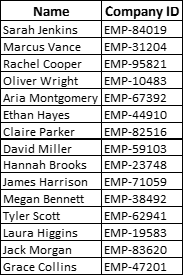
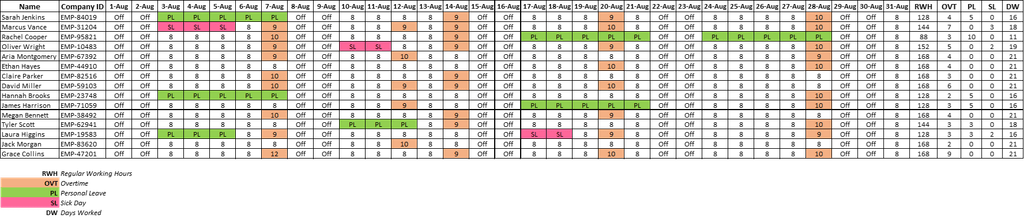
We need to take care of the August attendance file and everything related to it. More or less, an attendance file made in Excel would look like this:

We have in it every person, their company ID, and every day of the month. In each day, we must add details about said day, like so:
- Off – if we are talking about weekends (assuming your team does not work during weekends)
- 8 – total number of hours every person must work in a day (can be different, of course, based on your country, legislation, contract, etc.)
- PL – Planned Leave (basically what it says: vacation days people take)
- SL – Sick Leave
You might notice some cells have more than 8 hours in them; those are the overtime hours done by each person each day (I just added conditional formatting to highlight any cell with values greater than 8). This way, the OVT (overtime) will stand out and make it easier for me to check before sending it to payroll.
Now, let’s look at the entire file and see what it looks like, as we have some additional columns that help us track other aspects we need.
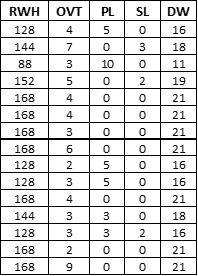
The last 5 columns in the file will have specific and necessary details regarding the following aspects:
- Normal (Regular) Working Hours – how many hours people worked per month
- OVT – total number of overtime hours in a month
- PL – total number of Planned Leaves (as number of days)
- SL – total number of Sick Leaves (as number of days)
- DW – total number of days worked in a month
If you ever find yourself in the situation of having to manually create this, here are the formulas I used for each of these last 5 columns:
Regular Working Hours

Overtime

Planned Leaves

Sick Leaves

Days Worked

While it might seem like a lot, with a bit of patience and will, you can turn any Excel file into something like this.
But why must we do this? Well, people have to eat and pay bills, and they can’t do that if someone (that would be YOU) doesn’t do a good job of keeping track of how many hours they worked in a month. In reality, just FYI, these files tend to be more complicated; you might have to add other aspects like night shifts, weekend days, part-timers, etc. Attendance tracking is your Manager 101: the very essence of the job description.
Coverage, Workload, and Proper Scheduling
Linked in a way with attendance, but not the same thing, is a strange topic that, again, not many really think about before accepting the position of leader: how do I plan my team’s workload efficiently?
It’s a question for the ages, and a topic that will generate friction, complaints, and angry faces regardless of how good of a person you are. People will always dislike this topic because there is absolutely no way you can give everyone on the team the exact vacation days they want every single time. It’s like a relationship: people must compromise and deal with it the best they can.
Running a business and keeping employees motivated is not just a quick meeting, a pep talk, or an inspirational speech. There’s a lot of work behind the concept, and a great leader is someone who knows how to prepare for future events in such a way that the team is not completely overwhelmed when they come.
To achieve this, you need to understand how good coverage works, how to look at your workload, and how to implement a great scheduling plan. Any good capacity calculation starts out with the volumes of work. Let’s assume we are looking at August and trying to understand what coverage we need (again, a very basic and simple example). To do this, let’s pull a report covering 2022–2025 with all the volumes processed each day during the month of August every year. Let’s say it looks like this:
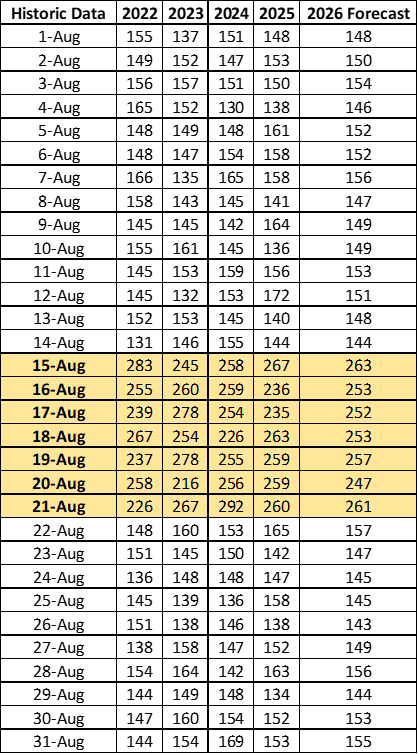
In this table, we see every day from August of every year since 2022. A close check on it reveals that August 15–21 of each year has an increase in volume. In the last column, we need to estimate the potential volumes for 2026. We can either ask the customer if they have the actual numbers, or we can use our own skills to try and figure this out. Without getting into very complex statistics, here is a very basic and simple way: add up each day across the years and divide by 4 in a line, like this:

With this new data, we can now see that the trend we observed in past years will also (in theory) hold true this year.
So, what do we do next? We start with a basic workload table, where we will add the information we already know: estimated volumes (based on the above calculation), total FTEs, total planned leaves during the peak days, and total sick days. If you are struggling with the acronyms or with some of the basic statistics, here are two articles you might want to check out first: Corporate Jargon: A First-Time Manager’s Guide and Intro to Statistics: A First-Time Manager’s Guide.
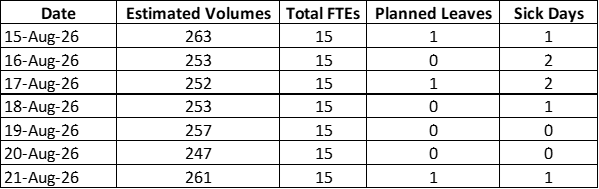
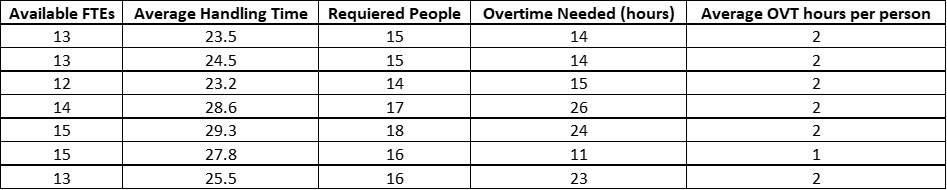
Now we need to start some basic calculations to understand what we need, like:
- Available FTEs: Total FTEs – (Planned Leaves + Sick Leaves)
- Average Handling Time: assuming you captured the AHT across the years and you know, on average, the time it takes in each of these days for 1 person to manage 1 volume
- Required People: ((Estimated Volumes * Average Handling Time) / 60) / 7. (60 is the number of minutes in an hour – we transformed the Volumes * AHT from minutes into hours – and 7 is my estimation of the actual number of hours people actually work in a day, as you have to take into account meetings, reading emails, trainings, and other things that are not specifically related to processing the volumes.)
- Overtime Needed: (Required People – Available People) / 8
- Average OVT per hour per person: Overtime Needed / Available FTEs (and just round that up)
Using Management Portals
In any company, you will have a bunch of portals and/or tools you will need to use. Don’t be fooled by the idea that you can learn them once you actually need to use them: be smart and prepare before you actually need to use them. By allowing yourself a bit of time to learn beforehand, you will create space and time for yourself to get familiar and know what is what, while also decreasing your chances of making mistakes. The last thing you need as a beginner is more room for mistakes: you will make plenty of them, no need to add more.
While portal management or learning seems really boring, get used to it – you’ll be spending a lot of time in them. The better and faster you know them, the easier it gets. That’s the thing in management: you can’t pick and choose what you want to do and what you don’t want to do. Some things will just be part of the deal, and there’s absolutely no way around it.
Compliance and Performance Standards
I’m not sure if someone has told you this before, but a lot of the time you spend as a leader will be in Excel (or related tools) tracking volumes, people, errors, quality, feedback, SLAs, KPIs, etc. You might even need a tracker for all the trackers you need to track.
Part of this tracking, and related to HR basics, are the compliance aspects. This is something any leader must follow up on, check regularly, and make sure is on track. Compliance will come in many shapes and/or forms; however, the core principle is always the same: you need to have the status of all of them at all times. Here is a simple example of compliance tracking for our fictional team:
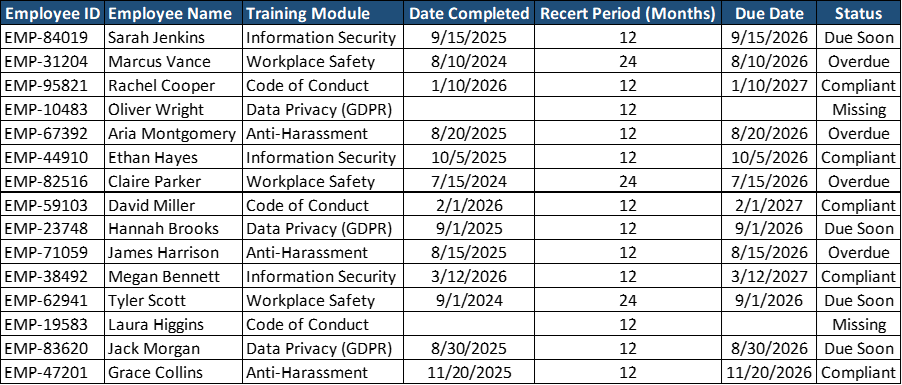
It’s a simple table with basic information: name, employee ID, training name, date completed, frequency (after how many months must they repeat it), Due Date, and Status. By having this easy-to-make table, you can keep a close eye on the compliance aspect of your team and even create different views if you need to share them in a deck.
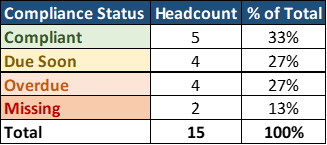
An overall view of the team from this point of view:
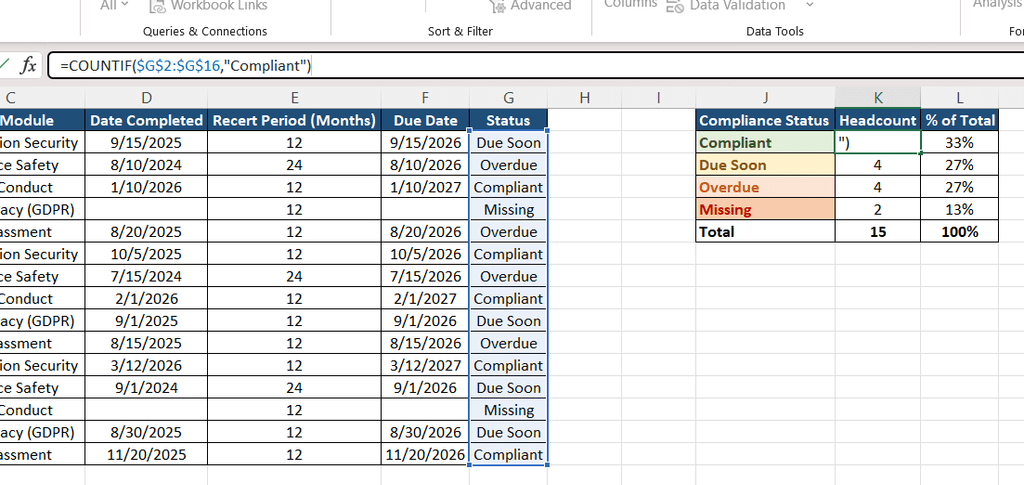
For the Headcount, I used this formula:
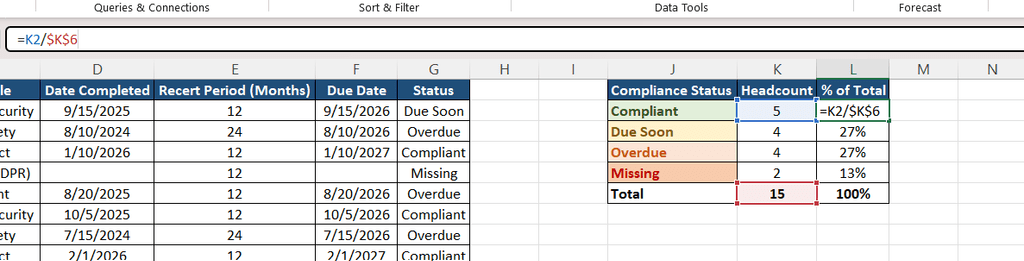
And for the % of Total, I used this formula:
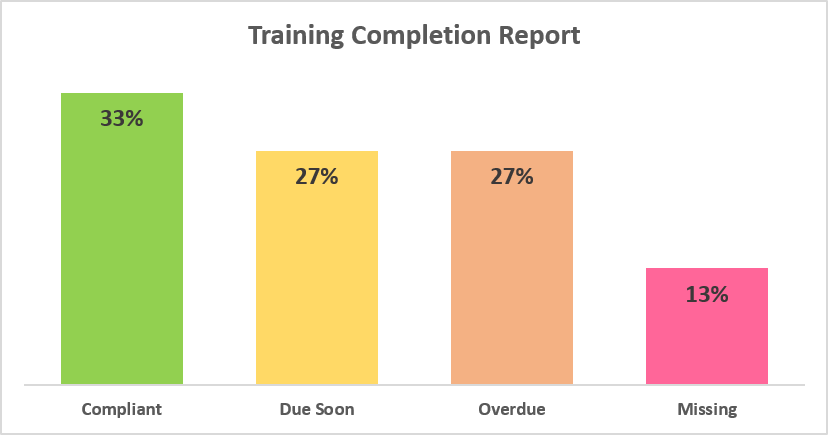
And of course, because we love them so much, a picture would not be complete without a chart:
Performance Evaluation Tools
This is maybe one of the first things some new managers want to check out. The idea here is simple: review the past performance of the team and see what the historical data says. Now, I need to make my own personal notes here:
- Sometimes this is not the best idea. You don’t know what the previous manager was like, how biased they were, how performance was actually calculated, etc. IF you find yourself in a position where you might become influenced by them, just don’t look at them. Make a clean break and take the team as they are and as they perform with you.
- In the happy event that performance evaluation was balanced and fair, this can be a very powerful tool at your disposal because it gives you a lot of background and information about the people. This will help you better understand and provide much-needed context for certain things. Use it wisely.
Personal Performance Notes
Now this is something you might want to start doing: keep a simple employee tracker file (I told you: trackers all over the place!) that you can use to keep notes on feedback. It can look something like this:
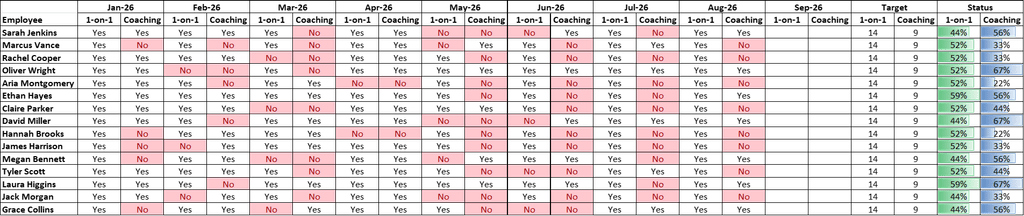
Also, regarding feedback and HR basics, it’s good practice to track the coaching and 1-on-1 sessions you are doing. Maybe you have a target every month, or maybe it’s something at your discretion. Let’s assume you have a target, and let’s use our fictional team to see what that would look like.
In such a file, you can track every month each coaching and each 1-on-1 session with a simple Yes or No. I just used conditional formatting to highlight in red when a cell has “No” in it. At the end, I added 2 formulas to keep track of the overall coaching and 1-on-1s done as per the target (assuming we have one).
1-on-1 Formula:

Coaching Formula:

Keeping the Admin Work Low-Stress
I know it’s a bit overwhelming – all these trackers, formulas, tables, and charts – but in time, you will learn and adapt. It’s very important not to feel like this is the end or that you can’t manage. This is why you need to book enough time to do these administrative tasks. Make sure you have a recurring task in your calendar and use that time to do all these things and other similar tasks. Don’t just go with the flow and think, “Well, it’s fine, I’ll do them as they come.” This is a big mistake first-time managers make, assuming they will just squeeze admin time between meetings or other duties. You don’t know what’s going to come, but you can better prepare for it by booking the time in advance. And don’t be afraid of using “Do Not Disturb” – that is why it’s there. Just don’t be that person with DND on all the time, because then people will begin to question your availability and skills. Balance in all things is the answer.
Use your HR Business Partner. Many managers are either too scared or too confident to actually reach out to the HRBP and form a good working relationship. These are highly skilled people with a lot of know-how, and the more time you spend with them, the better you will understand many things. Trust me, there are so many things you will simply not be able to do without the support of HR.
Until the next article, stay safe, happy, and healthy!